

Nano Banana 2.1 Reference Images: Preserve Faces and Products
Use each Nano Banana 2.1 reference image for one named purpose: identity, product detail, outfit, composition, or visual direction. Put the strongest identity or product anchor first, explain what each image controls, and state what must remain unchanged. Add references only when they contribute information the prompt cannot describe reliably.
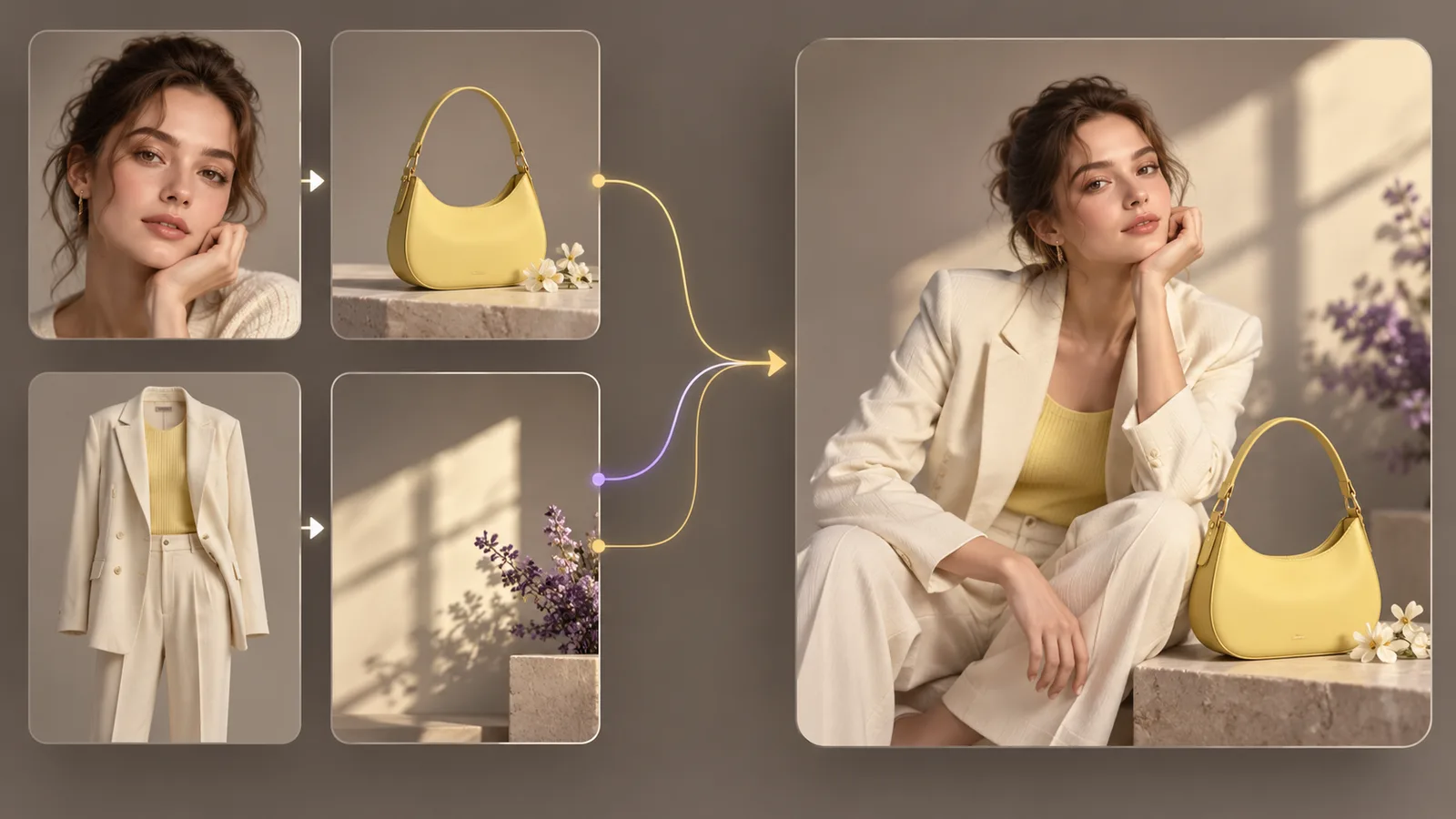
The short answer
A dependable multi-reference prompt has three parts:
- Reference map: what each uploaded image controls.
- Requested result: the new scene, action, or composition.
- Preservation rules: the details that may not change.
Example:
Reference 1 is the identity anchor. Reference 2 controls the cream suit. Reference 3 controls the yellow handbag shape and color. Reference 4 controls lighting and palette only. Create a seated editorial campaign portrait in a warm studio. Preserve the person's facial structure, skin tone, hairstyle, and apparent age; preserve the bag's shape, handle, material, and yellow color. Do not copy objects from reference 4.
How many references can you use?
The current nanobanana21.net editor accepts up to 10 reference images for Nano Banana 2.1. Google's documentation describes support for up to 10 objects with high fidelity and up to four characters for resemblance in a workflow. Those categories explain why “14 references” should not be read as 14 equally strong identity anchors. See Google's official image generation documentation.
Ten is a ceiling, not a target. Start with the smallest set that defines the task.
| Task | Practical starting set |
|---|---|
| Put one person in a new setting | One identity reference, optionally one outfit or setting reference |
| Edit a product campaign image | One full product reference and one detail close-up |
| Build a two-person scene | One clear identity reference per person |
| Match a composition | One subject reference and one layout reference |
| Combine product, talent, and art direction | One identity, one product, one outfit, one visual-direction reference |
Choose a strong identity reference
For a person, choose an image with:
- a clear, unobstructed face;
- even light without a strong color cast;
- enough resolution to inspect the eyes, nose, mouth, jaw, and hairline;
- a natural camera angle close to the requested output;
- permission from the person shown.
A wide group photo, heavy beauty filter, sunglasses, dramatic side profile, or tiny face gives the model less identity information. Use a second portrait only when it adds a missing view and does not conflict with the first.
Label the anchor explicitly:
Reference 1 controls identity. Keep the same person, facial proportions, eye shape, nose, mouth, skin tone, hairstyle, and apparent age.
Avoid “100% identical” promises. Generated results still need human review.
Protect a product accurately
Use one clean full-product image and add a detail reference only for information that is hard to see, such as a label, cap, port, control, fabric texture, or clasp.
Write:
Reference 1 controls the product's full geometry, proportions, green finish, and three-quarter camera angle. Reference 2 controls the front label and silver cap. Keep those features unchanged. Replace only the background with a pale stone studio and add a natural contact shadow.
If exact packaging copy matters, plan to composite the approved label after generation. AI can create a convincing campaign scene while still changing letters or small geometry.
Separate content references from style references
The model may copy an object from an image you intended only as visual inspiration. State the boundary:
Reference 4 controls warm side lighting, low contrast, and the cream-and-violet palette only. Do not copy its person, clothing, furniture, or flowers.
Concrete visual attributes work better than a vague phrase such as “use this style.” Name lighting direction, contrast, palette, lens feel, material, or layout.
Avoid conflicting references
Conflicts occur when two images give different answers to the same question:
- the same person with different hair colors;
- a product photographed with two package versions;
- two incompatible camera angles;
- daylight and neon references with no priority;
- several style images with unrelated palettes.
Resolve the conflict in words or remove one image. For example:
Use the face and hairstyle from reference 1. Ignore the hairstyle in reference 2; reference 2 controls the jacket only.
A repeatable four-reference workflow
Reference 1: identity or hero product
This is the non-negotiable anchor. Put it first and describe the exact features to preserve.
Reference 2: secondary asset
This may be an outfit, accessory, package detail, or second person. State whether it should appear in the final image.
Reference 3: composition
Use this for camera height, framing, subject placement, or negative space. Tell the model not to copy its people or products.
Reference 4: lighting and palette
Extract a small set of attributes: soft window light from the right, warm cream background, restrained violet accents, and natural shadows.
Then describe the final result in one sentence and finish with preservation rules.
Prompt template
Reference roles: Reference 1 controls [identity/product]. Reference 2 controls [detail/outfit]. Reference 3 controls [composition only]. Reference 4 controls [lighting/palette only].
Result: Create [deliverable] showing [subject and action] in [setting], framed as [composition and aspect].
Preserve: Keep [specific identity or product features] unchanged.
Change: Change only [allowed elements].
Exclude: Do not copy [unwanted people, objects, text, or logos] from the visual-direction references.
For a broader set of reusable prompts, read the Nano Banana 2.1 prompt guide.
Test references at low cost
Start with one 1K output. If the result is wrong, diagnose the reference map before increasing resolution or batch size.
- Check whether the anchor is recognizable.
- Check whether the product or outfit comes from the correct image.
- Check whether a style reference introduced unwanted content.
- Remove one ambiguous reference.
- Revise one role description and retry.
When the mapping works, move to 2K for detail review or 4K for a selected final direction. See the pricing and credits guide for the current 2/4/6-credit resolution tiers.
Review the final image
For people, inspect eyes, teeth, hairline, ears, hands, age, and skin tone. For products, inspect silhouette, proportions, openings, controls, label, logo, material, reflection, and shadow. Compare with the original references side by side.
If one detail fails, write a focused revision that changes only that issue. The troubleshooting guide covers common failure patterns.
Frequently asked questions
Is more reference imagery always better?
No. Every input adds information and possible conflict. Use the minimum set that defines the task.
Can I use four people in one scene?
Google documents character resemblance for up to four characters in this model's workflow. Results still require identity and consent review.
Why did the model copy furniture from my style reference?
The reference role was probably under-specified. Say which visual attributes to use and explicitly exclude its people and objects.
Can a close-up label reference guarantee correct packaging text?
No. It improves context but does not guarantee exact letters. Composite approved packaging artwork for accuracy-sensitive use.
Which image should I upload first?
Put the most important identity or product anchor first, then list the same order in the prompt.
Last checked October 15, 2026. The website accepts up to 10 JPEG, PNG, or WebP reference images, each up to 30 MB, for the current Nano Banana 2.1 option.